Developers please use https://api-stage.bimplus.net/v2 (stage version of Bimplus API) and
http://portal-stage.bimplus.net/ (stage version of Shop/Portal) for testing purposes. The production version of the portal is located under
https://portal.bimplus.net/ and the base url of the API is different for the production version.
Postman examples
- Please install Postman and import attached postman collections
BimPlus.postman_collection.json
postman_globals.json
Production.postman_environment.json
Stage.postman_environment.json
if you don't know how it works show this video PostmanCollection.mp4
 - Set Postman authenication direct to OIDC server, avoiding authentication request on start.
Postman supports OpenID authentication and can receive tokens directly from OIDC server.
Open request group (or even down to single request), select Authorization page, set authorisation type 'OAuth 2.0' and configure OIDC BIm+ server.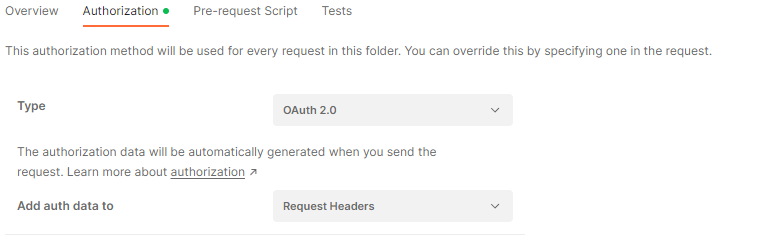
Then create Configure new token. Take server names from answer on discovery URL.
Preferrably use variables to specify different servers for different environments.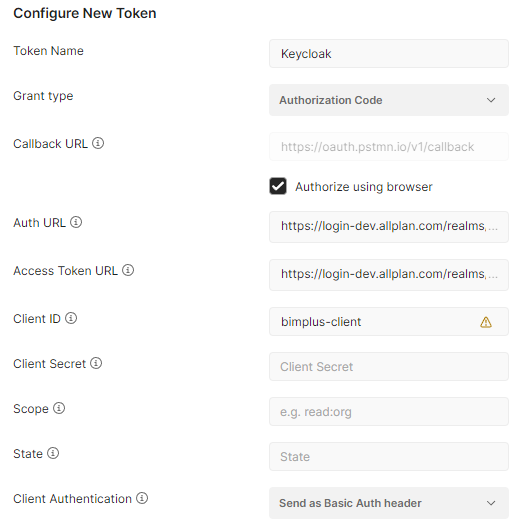
Click "Get New Access Token". Token should be loaded in token field.
Set "Auto-refresh Token" above to ON. - Example for Ifc Import, creation of new revisions and final revision compareIfcImportWithRevisions.mp4
- Example for creating Modeldata
by using Geometry templates controller, objects controller and geometry types
install additional postman collection Create Modeldata.postman_collection.json
Some mp4, which shows usage of geometry templates, csg and mesh dataCreateMeshdata.mp4Create Geometry with BimPlus Api.mp4Create Rooms.mp4 - Example for Attribute management and PSet definitionsMCS Propertysets.mp4
 Attributes.postman_collection.json
 MGE_AttributeTemplateDefinitions.mp4
 - Example for creating Alignments with REST APIAlignments.mp4Alignments.postman_collection.json
- Example for creating StructuralAnalysis Modeldata with REST API
you can find the same example as .NET Implementation using BIF assemblies under
https://github.com/Bimplus/bimplus-dotnet-demoStructuralAnalysisModel.postman_collection.jsonStructuralAnalysis.mp4AssembliesWithLinkToMembers.mp4y
C# demo projects
BimPlusCube.zip --> It explains how to create project data (nodes, geometry etc)
BimPlusDemo.zip --> It explains how to create project data (nodes, geometry etc) It explains how to authenticate, get your teams, get your project, how to create a project, how to get the project_id of your created project, create a model under the same project and upload an ifc file.
PHP Rest Client
BimplusRestClient.php(PHP REST client)
// Example 1: Hello function (no accessToken needed)
// ---------------------------------------------------------------------
$url = 'https://api-stage.bimplus.net/v2/hello';
$verb = 'GET';

// Create object
$request = new BimplusRestClient(
    $url,
    $verb
);

// Execute
$request->execute();
$response = $request->getResponse();

echo '<pre>';
print_r(json_decode($response));
echo '</pre>';


// Example 2: Get user data
// ---------------------------------------------------------------------
$userId = 'xxxxxxxxxxxxxxxxxxxxxxxxxxx'; // Bimplus userID
$url = 'https://api-stage.bimplus.net/v2/users/' . $userId;
$verb = 'GET';
$accessToken = 'xxxxxxxxxxxxxxxxxxxxxxxxxxx'; // accessToken

// Create object
$request = new BimplusRestClient(
    $url,
    $verb,
    $accessToken
);

// Execute
$request->execute();
$response = $request->getResponse();

echo '<pre>';
print_r(json_decode($response));
echo '</pre>';


// Example 3: Update user data
// ---------------------------------------------------------------------
$userId = 'xxxxxxxxxxxxxxxxxxxxxxxxxxx'; // Bimplus userID
$url = 'https://api-stage.bimplus.net/v2/users/' . $userId;
$verb = 'PUT';
$accessToken = 'xxxxxxxxxxxxxxxxxxxxxxxxxxx'; // accessToken
$requestBody = array(
    'email' => 'new.email@allplan.com'
);

// Create object
$request = new BimplusRestClient(
    $url,
    $verb,
    $accessToken,
    $requestBody
);

// Execute
$request->execute();
$response = $request->getResponse();

echo '<pre>';
print_r(json_decode($response));
echo '</pre>';
A Simple Javascript example
jQuery(document).ready(function() {
	jQuery("#datagrid").jqGrid({
		datatype : 'json',
		type : "GET",
		ajaxGridOptions : {
			contentType : "application/json"
		},
		loadBeforeSend : function(xhr) {
			xhr.setRequestHeader('Authorization', 'BimPlus 199c55110e2044b88e21a0c1cbb02fe3')
		},
		url : 'http://api-dev.bimplus.net/v2/teams',
		colNames : ['ID', 'Name', 'Slug', 'Status'],
		colModel : [{
			name : 'id',
			width : 200,
			align : "center",
			sortable : true
		}, {
			name : 'name',
			width : 200,
			align : "center",
			sortable : true
		}, {
			name : 'slug',
			width : 200,
			align : "center",
			sortable : true
		}, {
			name : 'status',
			width : 200,
			align : "center",
			sortable : true
		}],
		jsonReader : {
			repeatitems : false,
			root : function(obj) {
				return obj;
			},
			page : function(obj) {
				return 1;
			},
			total : function(obj) {
				return 1;
			},
			records : function(obj) {
				return obj.length;
			}
		},
		rowNum : 10,
		rowList : [10, 20, 30],
		pager : '#pager10',
		viewrecords : true,
		caption : "Bimplus Team Details",
	}).navGrid('#navGrid');
})
window.setTimeout(refreshGrid, 5000);
function refreshGrid() {
	var grid = jQuery("#datagrid");
	grid.trigger("reloadGrid");
	window.setTimeout(refreshGrid, 5000);
}
ObjectiveC (iPad) Examples
Authentication
Find out how many teams I am part of
Get team project list
Get project details
Get project topology
Get project disciplines
Upload project thumbnail
Create an issue in the project
Get the issue list from the project
Delete all the issues from the project
Create a new pin for the issue
Get all the pins of the issue
Create/Upload a new attachment for the issue
Get the attachment list from the issue
